Showing posts with label mac os x. Show all posts

Tuesday, June 10, 2008

How to change your home directory in Mac OS X easily

First up, there should be no need for an average user to change their home directory for casual use. This option is only for geeks, please do not try just for the sake of trying.


1. Login as a user with administrator privileges and open System Preferences.
2. Click on "Accounts" under "System" section
3. Make sure the "lock" symbol in the bottom of System Preferences window is open. If not, click the lock, enter your password and it'll open up.
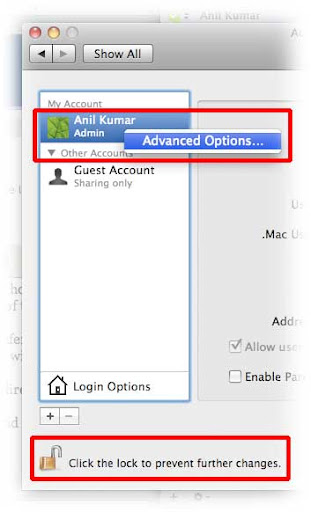
4. Ctrl+click (or right click with mouse) the username whose home directory you wish to change.
5. Click on "Advanced options..."
6. Enter a desired home directory location in the appropriate field and hit OK.

Related post on changing home directory in linux/unix can be found here.

Tuesday, May 01, 2007

How to backup iWeb sites in Mac OSX


iWeb is an incredibly simple application to make web-pages. I have made websites for myself and a few friends using iWeb, and now it's time for a system reinstall. Now, how do I backup (and restore) those websites? Here's the answer:

1. Open finder and go to the folder: /%username%/Library/Application Support/iWeb/
2. There will be a file named "Domain.sites" there - this is the file you want to backup. (If you have chosen to hide file extensions, this file will just be visible as "Domain"). Copy this file to a flash-drive or any other external location.
3. Reinstall the system, and then place this file in the same directory back again!

That's it! You can now make backups of your iWeb sites! :-)
