Showing posts with label Google. Show all posts

Monday, June 09, 2008

Have you tried the new "group chat" in Gmail?

Gmail now includes group chat, and few people have noticed.


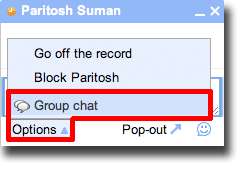
To use group chat, just start a conversation like usual. To add more people to the chat, click on "options" in the existing chat window and you can then invite other people in the same chat.


Tuesday, May 15, 2007

Google adds graphical usage indicator in Gmail

I signed in to my Gmail account today, and noticed that in addition to text-based usage notification ("You are currently using 1726 MB (60%) of your 2852 MB"), there is a graphic bar to indicate that too:


Interestingly enough, I could make this show up only on Firefox! IE doesn't display this as yet!

Tuesday, October 10, 2006

Official Google Mac Blog: Google and your Mac

Official Google Mac Blog: Google and your Mac

Google has now started a brand new blog focusing on Macs, another step forward in their embracement of the Mac.

The page has links to mac software developed by Google, Dashboard widgets for Mac OS X, a mini tutorial on Picasa Web Albums, and some more information. Check it out!

Tuesday, September 26, 2006

How to synchronize firefox bookmarks over any number of computers

Note: This article was written about Google Browser Sync, a product that has been discontinued as of today. The same purpose can now be achieved by installing "Weave" add-on for Firefox.

I have been using the internet since 10 years now, and have noticed one thing. Time and again, I visit few sites that I like so much. I bookmark them, for easy return later. But then, I lose the bookmarks because I erased the hard disk, and never remembered to backup bookmarks. There have been times when I backed up bookmarks, but never cared to restore them. Things get more complicated given I want to use the same bookmarks at home and office.

Hmm... I wish there was a way I could store the bookmarks on an internet server, and my browser could synchronize it automatically from there.

Few people know that Google (yes, again!) has a easy solution to this. This service is called Google Browser Sync, and it works with Firefox only at the moment.

What it does: Automatically backs up your Firefox bookmarks, cookies, saved passwords, history, and last tabs/windows you opened... and then restores it when you use a different computer (or the same computer after you format your hard drive, for example).

How it works: Google simply backs up your browser information on its servers, and then restores it whenever required (e.g. if your browser crashes, your hard disk dies, or you simply switch off your home computer and move to office computer).

How to do it:
1. Requirements: Firefox and a Google account (e.g. a working gmail account).
2. First open Firefox, and download Google Browser Sync extension for Firefox from this page.
3. Exit firefox, and relaunch it.
4. Google Browser Sync will launch automatically, and ask you for your Google account and password. If you have a Gmail account, supply those username and password here. It'll also ask you to set a PIN number as additional measure of security.
5. Next, it will ask which all settings you need to synchronize. I selected everything except stored passwords.
6. Done!

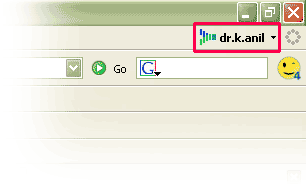
Google Browser Sync will display as this:

To check this, exit firefox with 4-5 windows/tabs open. Now restart firefox (from some other computer if you can), and you'll be prompted to restore your last session. If you choose to restore it, Firefox will spring back to life exactly in the same condition as it was last time. This includes any sessions you may have logged in (cookies).

That was neat! Forget backing up bookmarks manually... Let Google do it for you!

If you don't want to use Google Browser Sync anymore, you can uninstall it. To do this, open firefox, click Tools --> Extensions. Now select Google Browser Sync extension from this list, and click on the Uninstall button.

Saturday, September 23, 2006

Google suggest: What is it, and how to use it.

Part 1: What is Google Suggest?

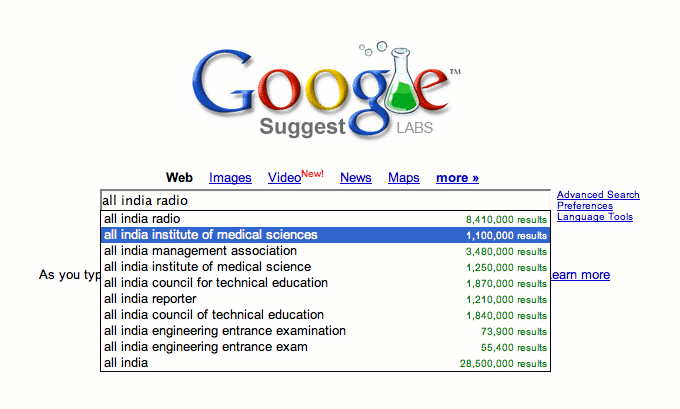
Google suggest looks like the usual google homepage only, but it tries to "guess" what you are typing, and autocompletes your entries based on the number of search results. A screenshot:


In this example, when I type "All India", google tries to suggest that the most popular search phrase beginning with "All India" is "All India Radio" with over 8 million results. Second in rank is "All India Institue of Medical Sciences" (which I was searching for) with about 1 million results.

Part 2: How to use it?

Change your browser homepage to this:
http://www.google.com/webhp?complete=1&hl=en
(If you use a language other than English, change the last two letters of this link to a language of your choice, e.g. replace en with hi for Hindi, de for German, fr for French etc. On testing, I found that suggest does not work with most non-English languages.

Note that when you typing something, Google automatically guesses what you want, and tries to fill up the search field with the top result. If you like the first phrase, simply press Enter / Return on your keyboard to search for that. If you like the other search phrases, you can use the arrow keys on the keyboard to select them, and then press enter to activate. You can also use a mouse for this if you like.

Tuesday, September 19, 2006

Ubuntu and Vista: Trends by Google

Google Trends is a unique service aimed at studying the trends in online google searches. It compares keywords you supply based on the volume of Google searches as well as volume of news reporting on the keywords. I saw the trend for ubuntu vs. vista, and the results are here.

Some comments:

1. Vista has shown dramatic ups and downs, whereas Ubuntu continues its steady rise. The tremulousness of vista graph may in part be due to the Microsoft vs. EU court rows, as well as the continued delays in shipping of vista. However, Ubuntu has continued to rise up, despite the fact it's a two year old baby.

2. Ubuntu has come up with four major releases in the last two years, whereas Windows has struggled to release Vista after about five years of effort. There could be several reasons Windows is lagging behind:

(i) Microsoft is trying to drag XP as long as it can. Thus, by releasing Vista late, it's buying time to develop the next release (Vienna).
(ii) Microsoft servers were hacked few years down the lane. So they are trying to patch up any security holes the hacker community may exploit.
(iii) Microsoft is trying to build "curiosity" among its users for Vista by delaying its release
There could be more reasons... but it appears that the delay will ultimately benefit Microsoft more than what earlier versions of windows did.

2. Somehow all the trends searches are from major cities in the Europe. In fact, more people are searching for Ubuntu rather than Vista in Norway, Finland and Spain. I think I can explain Finland by the fact that Linus Torvalds, the creator of Linux, hails from Finland.

3. The regionwise trends show that South Africa is the second most popular region for Ubuntu rather than Vista. I can explain this because Mark Shuttleworth, the creator of Canonical Foundation for Ubuntu, hails from South Africa. I have an african friend who says that South Africa is perhaps the most developed country in the entire Africa.

4. When it comes to Ubuntu, it appears that more searches are done on Ubuntu than it appearing in the news. This is very typical of any linux related news - many people are interested in it but somehow that doesn't make headline on any major news site (leaving out technical news agencies).

5. Despite whatever Ubuntu fans might say, I'd contend that Ubuntu is in no way a competitor to Vista... at least not in the first few months. I remember somewhat similar speculations were circulating when XP was in the coming... people used to post fervently in forums "Apple and Red Hat will kill XP" and things like that. But that did not happen. People are resistant to change - they're more likely to continue with doing whatever they are doing. And they're doing Windows. You know what I mean.

6.